
# Debugging Flo.w RDF
# Debug output
Flo.w RDF emits debug messages to the developer console in your web browser.
Debug output uses the 'debug' NPM library (opens new window). To enable debugging output set the following localStorage property (from the developer console or use your browser's web developer UI):
localStorage.setItem('debug', '*');
To view only Flo.w RDF debug output, enable the flow namespace:
localStorage.setItem('debug', 'flow:*');
You can also limit the output to enable or disable sub-namespaces. See the 'debug' library documentation (opens new window) for syntax.
# The Console Debugger
Flo.w RDF also provides a console debugger available in your web browser's developer console.
To enable the debugger, the enableDebug property must be set to true when calling ContextRegistry.initializeContext.
WARNING
We recommend only enabling the console debugger during development. See framework integrations in the Using Flo.w RDF section for examples of how to enable debugging only in development mode.
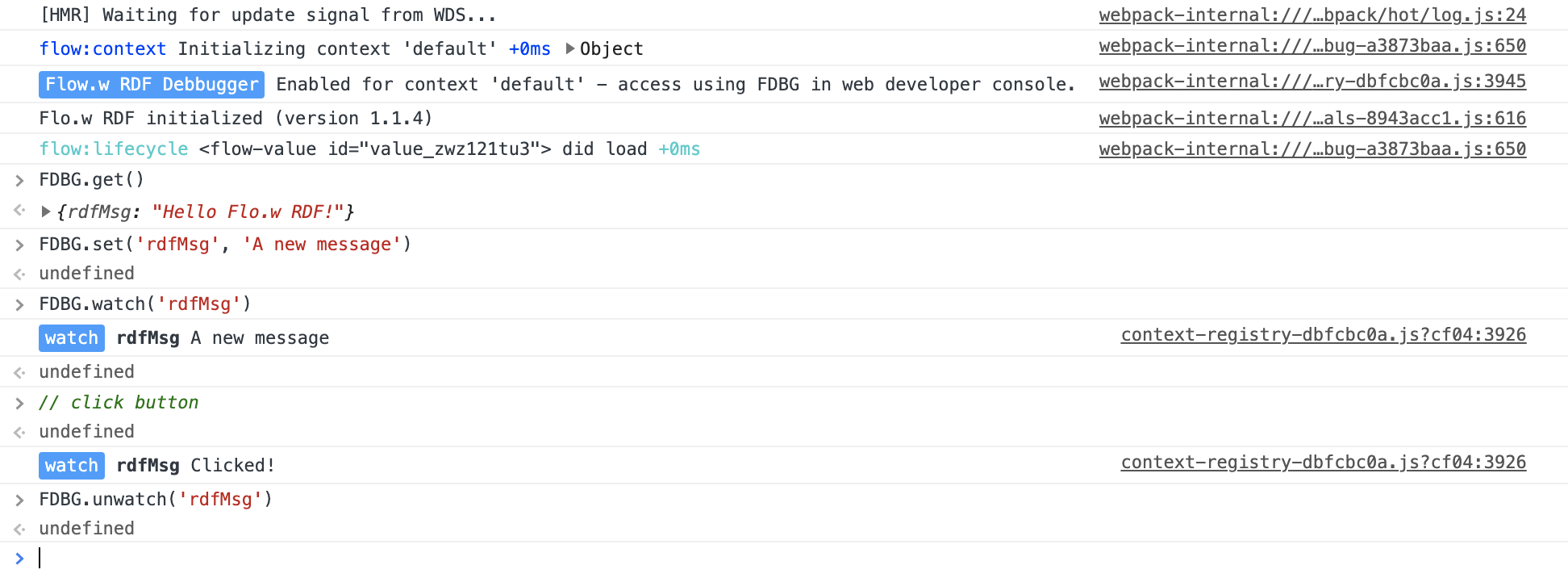
Use the FDBG global Debugger object in the web developer console to access the following debugging methods:
FDBG.get()- display current application state object.FDBG.get('propPath')- display value of a single application state property.FDBG.set('propPath', newValue)- set an application state property.FDBG.watch('propPath')- Watch changes to an application state property.FDBG.unwatch('propPath')- Stop watching changes to an application state property.FDBG.unwatch()- Disable all watches.
Example developer console output:
# Using StateStore.autorun
The StateStore.autorun method allows you to define a function that runs in a reactive context when Flo.w RDF application state changes. This can be used to add temporary debug output during development.
For example,
context.state.autorun(state => {
  console.log(`State prop 'prop1' has changed to ${state.prop1}`);
});
context.state.autorun(state => {
  console.log(`Query 'myQuery' has run. Results:`, state.queries.myQuery.results);
});
WARNING
Remember to remove debug logging before releasing your application!